Posts

Showing posts with the label Windows

How to make simple HTTP server using Python

Image
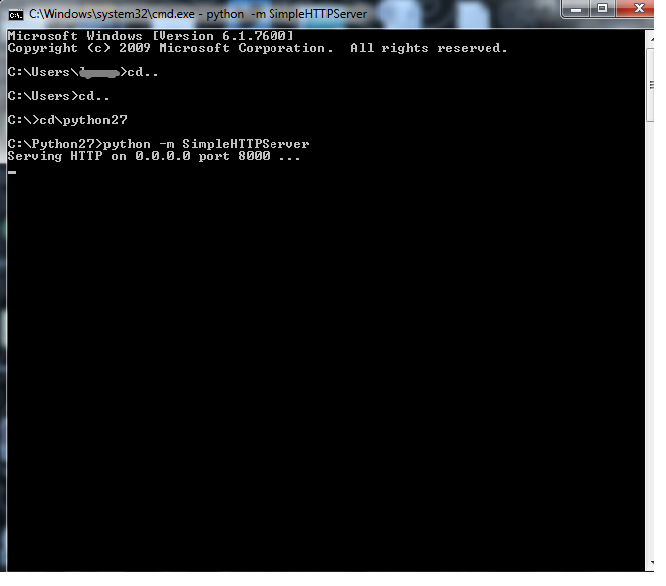
Here is the way .... 1. 2. Keep the file on Python Folder. 3. Type http://localhost:8000 on your browser 4. Surf on local machine

File Comparison in Windows with FC command

Image
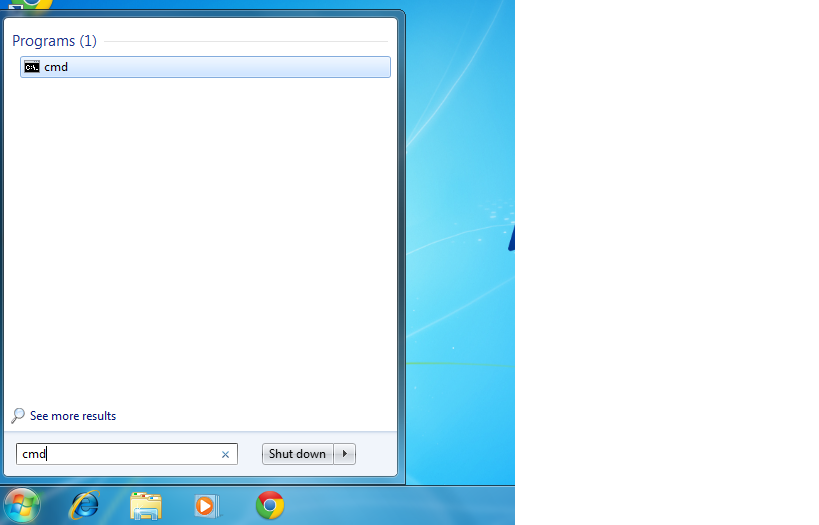
There is a nice command "FC" in windows to compare or difference between two file. Step:1 According to the picture below press windows key and type "cmd" on search box and by clicking on "cmd" open it   Step:2 Go to the file directory (the location of your files to be compared). My files are in "check" folder on desktop  and file's name are file1.html and file2.html. So I typed cd desktop/check If your files are in another location, then you have to go there Finally type "FC file1.html file2.html" and press Enter. Windows will show you difference between two files.

Launching Sublime Text from command-line Windows

Lets see step by step Windows: 1. Download and Install Sublime Text and git 2.Find the directory where Sublime is installed.  If you do not change the directory during installation this should be here   C:/Program\ Files/Sublime\ Text\ 2/sublime_text.exe .  To confirm, that your directory is right, run this  ls C:/Program\ Files/Sublime\ Text\ 2  within Git Bash.  You should see  sublime_text.exe  listed.  If you get the error  No such file or directory , Sublime is installed somewhere else for you and you'll need to find it.  For example, in 64 bit PC it might be under C:/Program\ Files\ (x86) 3.Open Git Bash and run this   echo 'alias subl="C:/Program\ Files/Sublime\ Text\ 2/sublime_text.exe"' >> ~/.bashrc Finally Close and re-open Git Bash. Typing  subl  in Git Bash should now open Sublime.

Download the ISO file for the version of Windows 7 you own

Home Premium SP1 (English, 64-bit) Professional SP1 (English, 64-bit) Ultimate SP1 (English, 64-bit) Home Premium SP1 (English, 32-bit) Professional SP1 (English, 32-bit) Ultimate SP1 (English, 32-bit)

How to install an .ISO file?

We are very familiar with file extension .exe.   Whenever we want to install any software in windows operating system, we do double click on *.exe file and most of the time the file name is setup.exe. But many software comes with not only one setup.exe file but also many others necessary files. In this case all necessary files and isetup.exe file are archived as ISO image (International Organization for Standardization).   An ISO file is nothing more than an archive, just like zip or rar or 7zip. Most of people think that ISO image or file could not be install without writing in CD or DVD or other optical disc. But it is possible!! Now step by step, I am describing the process of install an ISO file 1.        Get any archive software and install it 2.        Just unzip the ISO file 3.        And finally find the setup.exe and double it, to install.    ...

How to Add/Change IP/DNS Address In Windows 7

Image
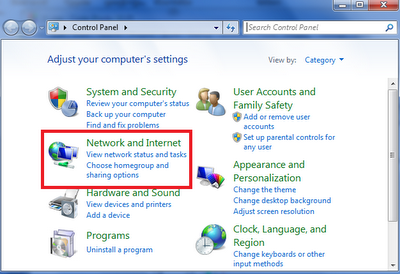
It is quit easy to add/change IP address or DNS (Damion Name Server) address in windows 7. But it is slightly different from windows xp. So the people who altered their Operating system windows Xp to windows 7, first time they become perplex about new way to change IP address.Here, I am describing step by step how to add/change IP or DNS address in windows 7. So lets start ..                                                              1. Start -> Control Panel     2.Click Network and Internet  3.Click on Change adapter settings   4.Right click you network connection and select Properties   5.Select Internet Protocol version and c...

How to delete temporary files from windows?

Image
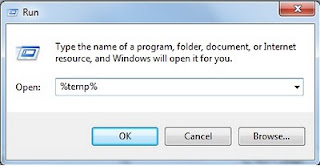
 From name of Temporary Files we can easily recognize that these are temporary and sometimes have no value in long term.  Computer creates these types of file for different purpose. When an application is running, these files are created in definite location namely TEMP folder. Time to time the TEMP folder will be larger as well as it takes disk space. Indeed, after closing the application these created file have no value. Accumulation of temporary files can happen for two reasons. One is for program crashed and another is for programmer of that program inadvertently forgot to add some code, which code’s function is to delete the temporary files after the end of program. However, you can follow these steps 1.        First Go Run 2.        Type %temp% 3.         Enter 4.        A new window will appears (Folder) 5.    ...

How to completely uninstall software?

It is very often that you don’t like the software that has been installed or found superior alternative. Now it is the only way to uninstall pervious software. Window has an option ADD/REMOVE to uninstall software found control panel. But window can’t completely uninstall the software; it appears that software is uninstalled, but remains some vestige. So you have to use another application . There are many applications are found for completely uninstall software.   Some software for completely uninstall, 1.         Revo Uninstaller Pro 2.        Total Uninstall 3.        Your Uninstaller 4.        IObit Uninstaller 1.1      As my real life experience I must have to say Revo Uninstaller is the best among them. It is very impressive.

Data Recovery Tools

Data is very important for everyone. Data may lose in various ways. Such as hard drive crash, deleted by virus or deleted inadvertently. These days we have many data recovery tools. Some these are free and some are needed to buy. If you search in Google this key word “Free data recovery tools” you will get bunch of link as well as bemused which is the best of them. Few months ago I have read an article on data recovery tools namely “Five Best Free Data Recovery Tools” on lifehacker . If you check this link you will be able to know details about these five free data recovery tools. Now look briefly - 1. TestDisk is an OpenSource data recovery tools and run on following operating systems: DOS (either real or in a Windows 9x DOS-box) Windows (NT4, 2000, XP, 2003, Vista, 2008, Windows 7 (x86 & x64) Linux FreeBSD, NetBSD, OpenBSD SunOS and MacOS X Download 2. Recuva is a freeware data recovery tools, from Piriform and run on Windows 7, Vista, XP, 2003 and 2000. From m...