Posts

Showing posts with the label How To Do

How to make simple HTTP server using Python

Image
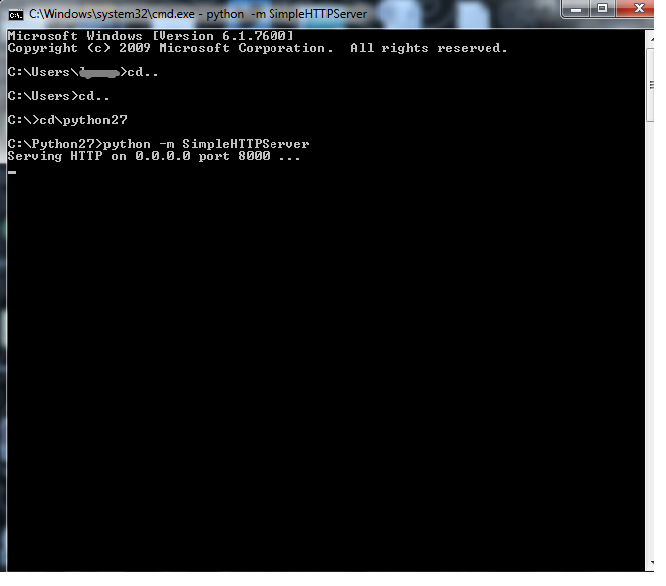
Here is the way .... 1. 2. Keep the file on Python Folder. 3. Type http://localhost:8000 on your browser 4. Surf on local machine

The Biggest Resume Mistakes According to Google's Head of HR

Google Head of HR Laszlo Bock reviewed more than 20,000 resumes in his carrier. He point-out five mistakes. Those are:   Typos      Length      Formatting      Confidential information      Lies According to him about Resume Length : " A good rule of thumb is one page of resume for every ten years of work experience. Hard to fit it all in, right? But a three or four or ten page resume simply won't get read closely. As Blaise Pascal wrote, "I would have written you a shorter letter, but I did not have the time." A crisp, focused resume demonstrates an ability to synthesize, prioritize, and convey the most important information about you. Think about it this way: the *sole* purpose of a resume is to get you an interview. That's it. It's not to convince a hiring manager to say "yes" to you (that's what the interview is for) or to tell your life's story (that's what a patient spouse is for...
While Loop with Python

While loop is pretty awesome in Python. Lets see an example: def print_numbers(j): #define a function print_numbers i = 0 while (i!=j): i = i+1 #increment print i print_numbers(6) #call the function Output: 1 2 3 4 5 6

Super simple way to send Facebook Messages Without Downloading Messenger

Image
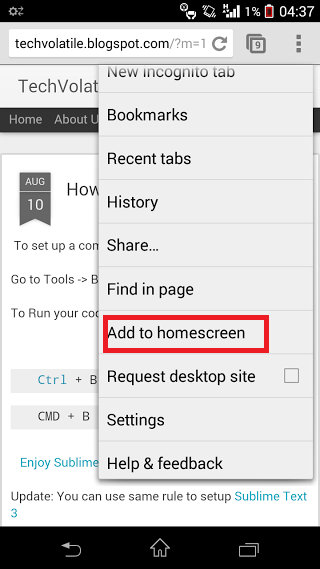
It is known to all that Facebook recently removed messaging option from its main app and insisting user to download Facebook Messenger Apps to continue messaging from mobile. Facebook user are pretty annoyed to download and use a separate apps for messaging only. But there is still a way to use Facebook messaging without download messenger apps. For this go to Facebook.com by using your mobile browser (Chrome, Firefox or any others ) and you'll be able to send and receive messages just like you would on a desktop.   To make easy log on Facebook from your mobile browser  you can create a short-cut for Facebook.com.To create short-cut & to add it on home screen Tab on"Add to homescreen". See the bellow picture.

How to run Python code from Sublime Text 2?

 To set up a complete Python IDE in Sublime Text 2. Go to Tools -> Build System -> (choose) Python then To Run your code:   Ctrl   +  B (For Windows) CMD + B (For OSX ) )     Enjoy Sublime Text 2         Update: You can use same rule to setup Sublime Text 3                                    

How to Setup Windows 7 or Windows 8 from USB drive? (Best & Easiest Way)

Image
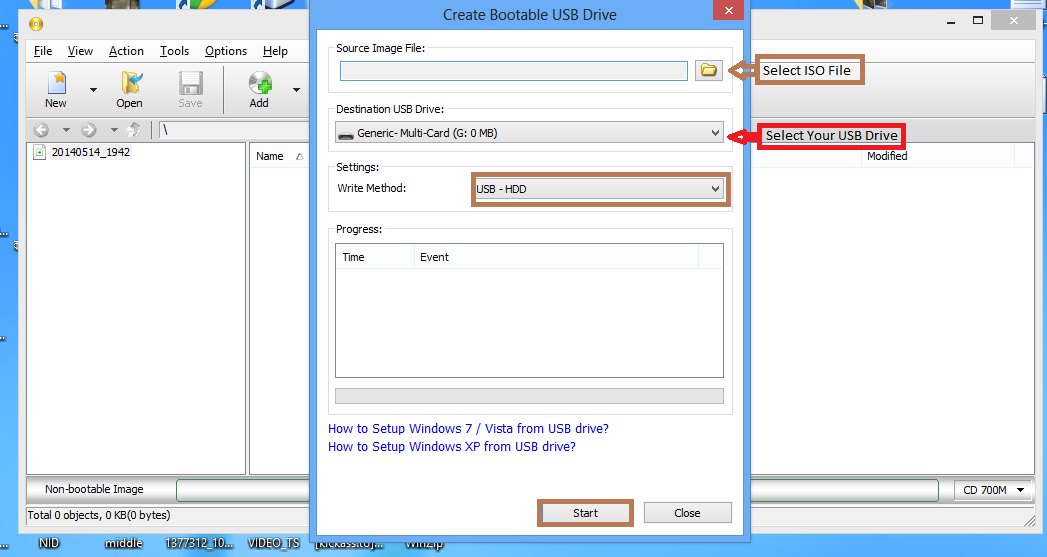
Requirements: 1.        ISO file of Windows 7 or Windows 8.(See here How to create ISO file Of CD/DVD)   2.        PowerISO   (v4.8 or newer version, download here ) 3.        USB Flash Drive (4GB) Steps: 1.        Insert the USB drive you intend to boot from 2.        Choose the menu "Tools > Create Bootable USB Drive". The "Create Bootable USB Drive" dialog will popup. If you are using Windows Vista or Windows 7 / 8 operating system, you need confirm the UAC dialog to continue 3.        In "Create Bootable USB Drive" dialog, click "..." button to open the iso file of Windows 7 or Windows 8. 4.        Select the correct USB drive from the "Destination USB Drive" list if multiple USB drives are connected to the computer. 5.    ...

How To Create an ISO Image File From a CD, DVD, or BD

You can easily create an ISO Image File From a CD, DVD, or BD using BurnAware Free

How to install an .ISO file?

We are very familiar with file extension .exe.   Whenever we want to install any software in windows operating system, we do double click on *.exe file and most of the time the file name is setup.exe. But many software comes with not only one setup.exe file but also many others necessary files. In this case all necessary files and isetup.exe file are archived as ISO image (International Organization for Standardization).   An ISO file is nothing more than an archive, just like zip or rar or 7zip. Most of people think that ISO image or file could not be install without writing in CD or DVD or other optical disc. But it is possible!! Now step by step, I am describing the process of install an ISO file 1.        Get any archive software and install it 2.        Just unzip the ISO file 3.        And finally find the setup.exe and double it, to install.    ...

How to Add/Change IP/DNS Address In Windows 7

Image
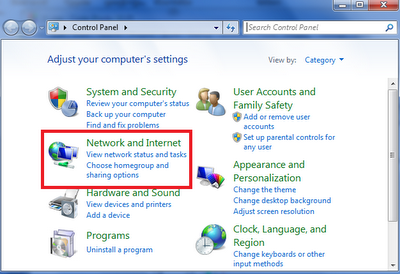
It is quit easy to add/change IP address or DNS (Damion Name Server) address in windows 7. But it is slightly different from windows xp. So the people who altered their Operating system windows Xp to windows 7, first time they become perplex about new way to change IP address.Here, I am describing step by step how to add/change IP or DNS address in windows 7. So lets start ..                                                              1. Start -> Control Panel     2.Click Network and Internet  3.Click on Change adapter settings   4.Right click you network connection and select Properties   5.Select Internet Protocol version and c...

How to Enable Facebook video chat/calling

Just few hours ago Facebook debut video calling service. It is a joint venture of Facebook and Skype. Facebook always developing itself and video calling service is an another great step to hold the position of popularity.   Last week Google revealed its social networking platform Google Plus with an option video chatting / calling and Google alias it “Hangout”.   From that time Facebook users are missing video calling opportunity hugely. So it is the time the for Facebook users to enjoy their self using video calling service. To enable video calling service you have to install a plug-in. just go here and enjoy it !! (You must have to be login on Facebook)

How to connect cake php to database?

Image
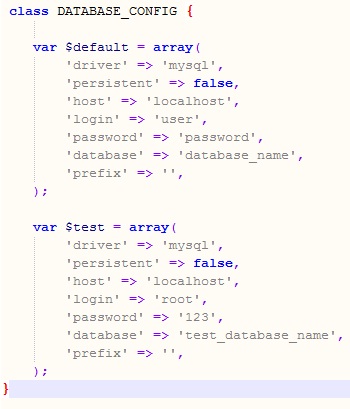
So no more talk, I will discuss how to connect cake php with database (Mysql) First you have to go https://localhost/security/index.php and create the user name and password. Second go https://localhost/phpmyadmin/index.php login and create login create a database. Suppose, our data base name is project Now you have to edit some filed. Then go C drive for C:\xampp\htdocs\cake_test\app\config Then you will see a file with name database.php Open this with windows Notepad or any other note pad like Notepad ++ After opening the file you will have a look like the beneath picture    Now you have to edit some fields to connect cake to database 1.        User 2.        Password 3.        Database_name In this example our user name is: root                    ...